
BANK AND PAYMENT PORTAL
Using our Bank and Payment Portal is not only easy, it saves you having to spend time on the phone to deal with any payment enquiries. The portal is protected by an extra layer of security, this means you have to log in to your Bilco Direct Account and then log in to the Bank and Payment Portal.
Things you can do on the Bank and Payment Portal.
View all past and pending payments
Change payment date
Change payment plan
Change bank account details
The first time you log into the bank and payment portal you need to create your password. The password that has been set for your Bilco Direct Account will not transfer across.
Please follow these steps to login to the portal for the first time. Once you have logged in to your account you will see this page:
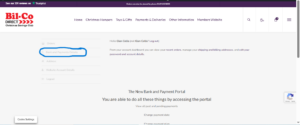
Simply click the Bank and Payment Portal Option (highlighted). Now Without Entering Any Details Just Select “Reset Password” (highlighted below) And It Will Take You To Another Page
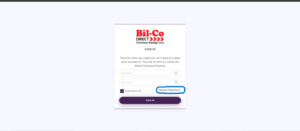
Now enter the email address that is registered with the your account in the reset password screen and wait for the email to arrive.
(please check junk folder after 10 minutes)
If you email address is registered you will see this screen.
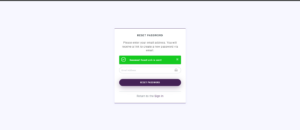
When the email arrives, it will contain a link, simply click the link and create the new password.
You will now be able to gain access to the bank and payment portal. If you do not have an active order you will not be able to gain access.